Hotel Software · Enterprise Hospitality Intelligence Suite
A clearer view. A better-run hotel.
EHIS brings room accounts, point of sale and management reporting into one hospitality workspace — developed around the practical questions of running a hotel.
English-language interface illustration · Fictional example data
350room configuration
5 + 5restaurants and bars
35editable item templates
Oneconnected operational view
From the floor to the figures
Know what happened. See what matters.
A room night, a restaurant bill, a card payment and an OTA commission tell different parts of the same story. EHIS keeps those distinctions visible, helping hotel teams follow transactions and management understand the day.
01
Follow the guest account
Link people and stays to the correct room account, then record charges and payments with their references.
02
Connect the operating areas
Organise hotel services, restaurants, bars, pool, room service, kiosk items, newspapers and expenses.
03
Reconcile the result
Keep sales and payments separate. Review daily activity, channel commissions and cashier differences without counting a room payment twice.
Inside the workflow
01 / Front office
From a room booking to a balanced account.
Prepare the guest profile, create the stay and book overnight accommodation. Restaurant, bar and other outlet charges can be added to the guest's room account.
Reservation and in-house room accounts
Protection against duplicate room-night entries
Split payments by cash, card or bank transfer
Invoice drafts with issuer, tax and bank information
Category buttons and PLU lookup put the product catalogue at the centre of the cashier workflow. Maintain your own prices, tax classifications, active items and physical stock.
Cashier illustration · Prices and stock are examples
03 / Management reporting
Close the day. Keep the detail.
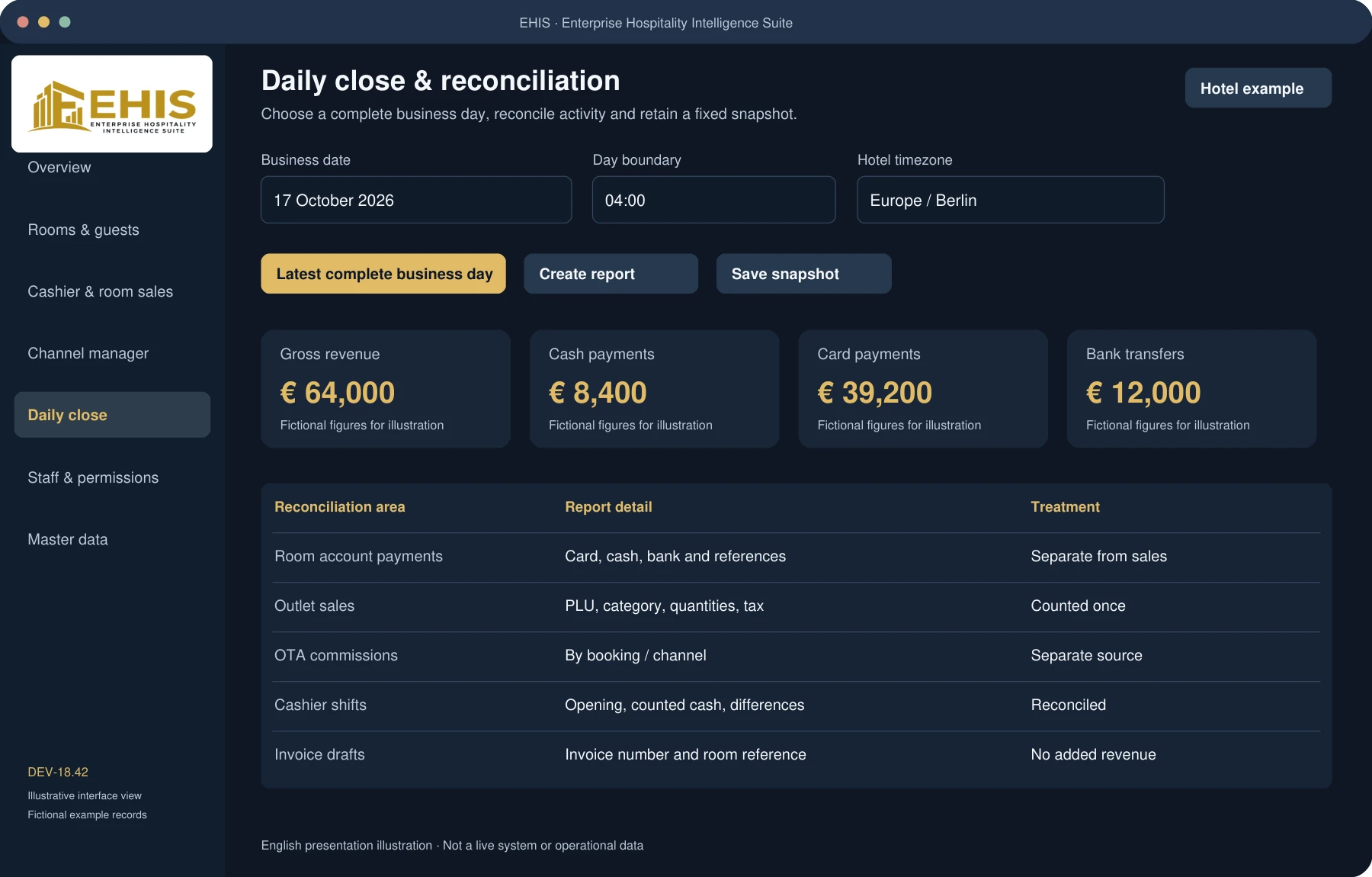
Select the latest complete business day and set the day boundary in the hotel's timezone. Review sales, payments, expenses, room activity and channel costs in a retained report snapshot.
Cash, card brands and bank transfers shown separately
Revenue by category and operating area
Channel revenue and commissions with source distinctions
Browse the workspace, from rooms and products to reports and invoice settings. Select any image to view it in detail.
These are illustrative English-language interface views based on the DEV-18.42 feature set, not live application screenshots. All records and figures are fictional. The current desktop application includes German interface labels.
Showing all 12 views.
Management · Illustration
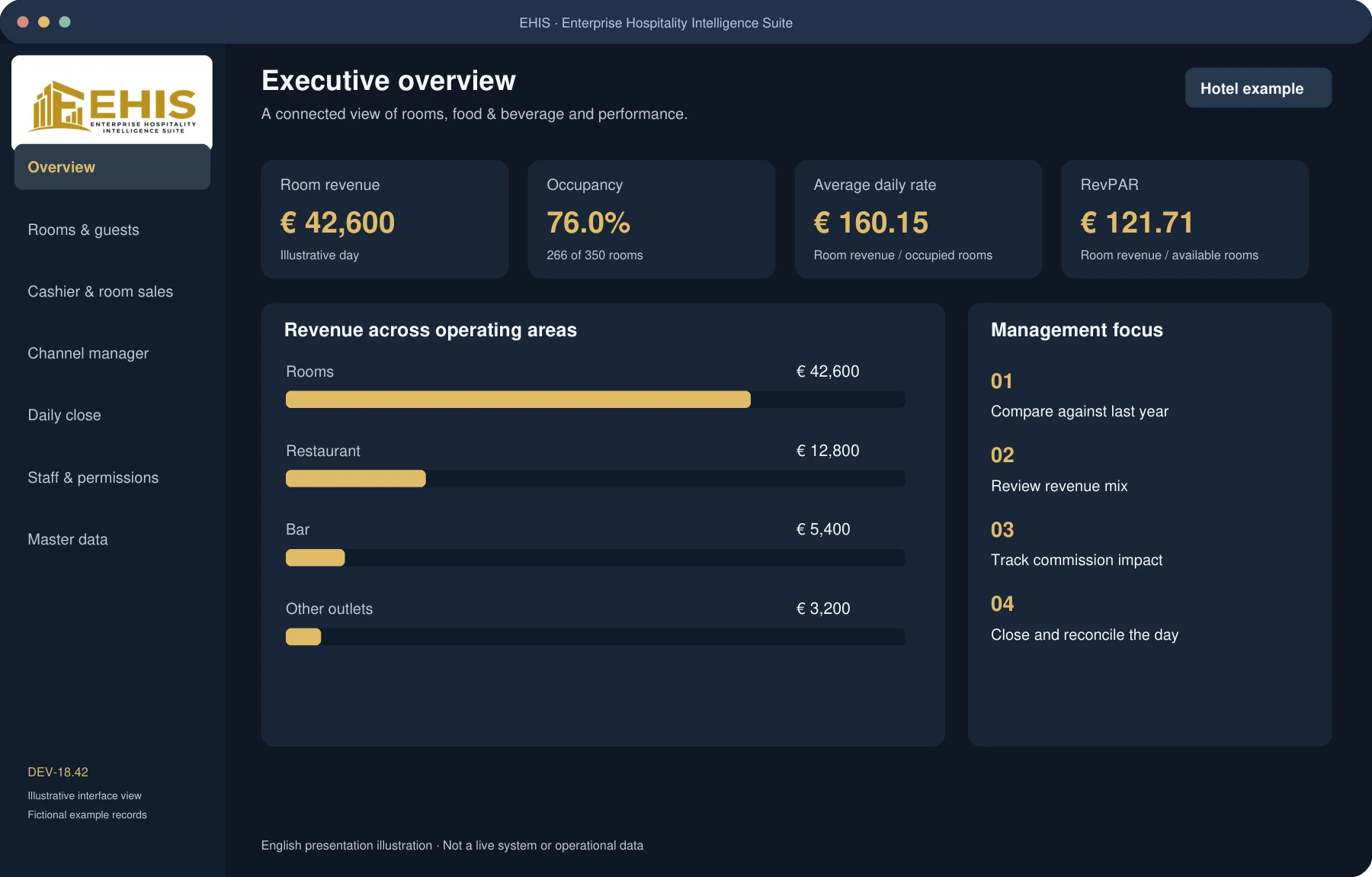
Executive overview
Illustrative management dashboard with room revenue, occupancy, ADR, RevPAR and revenue mix.
Front &Amp; Office · Illustration
Rooms & guest stays
Room overview and reservation workspace for a configurable 350-room property.
Front &Amp; Office · Illustration
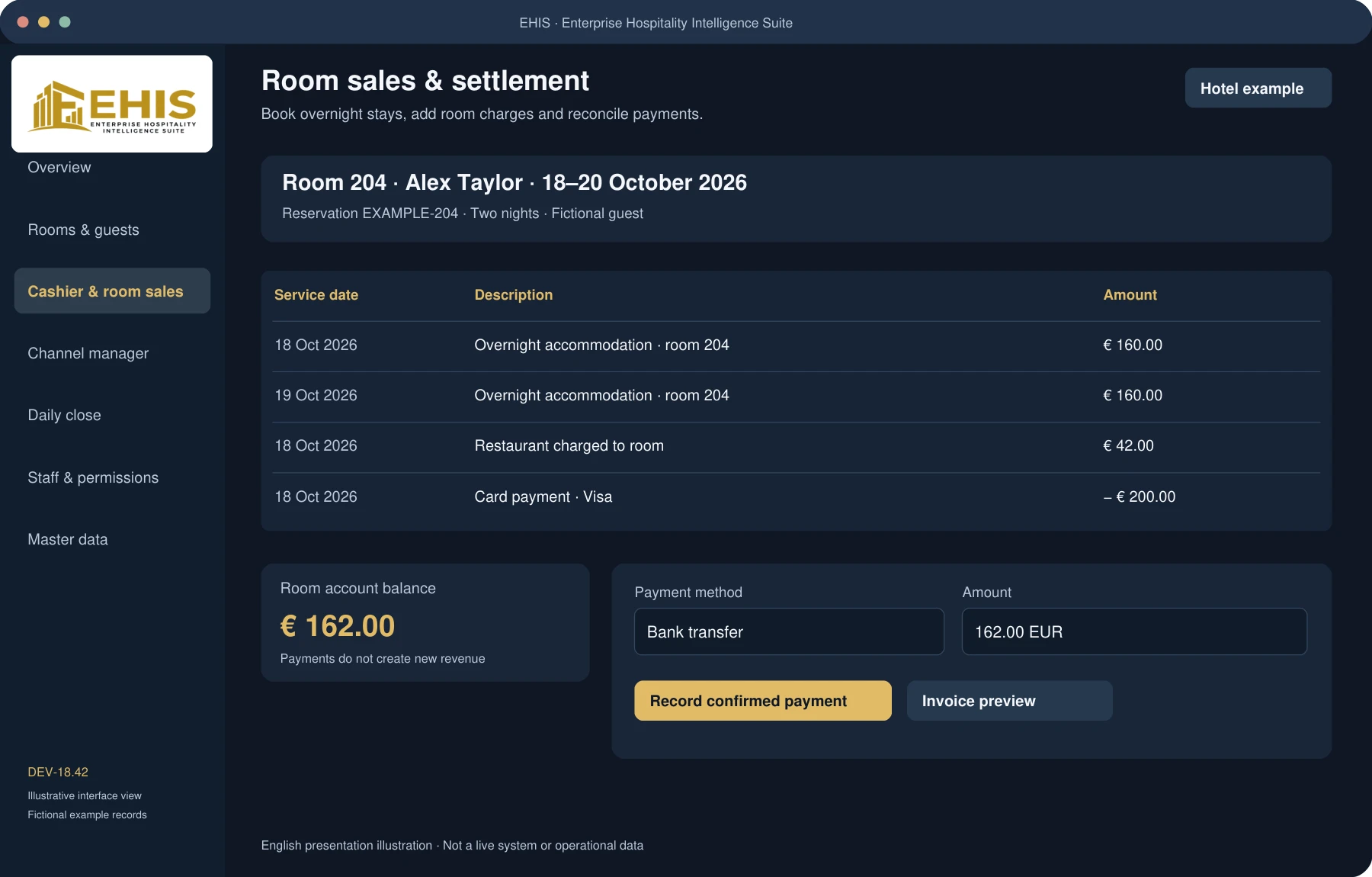
Room sales & settlement
Room account showing overnight charges, a restaurant charge, a card payment and the remaining balance.
Food &Amp; Beverage · Illustration
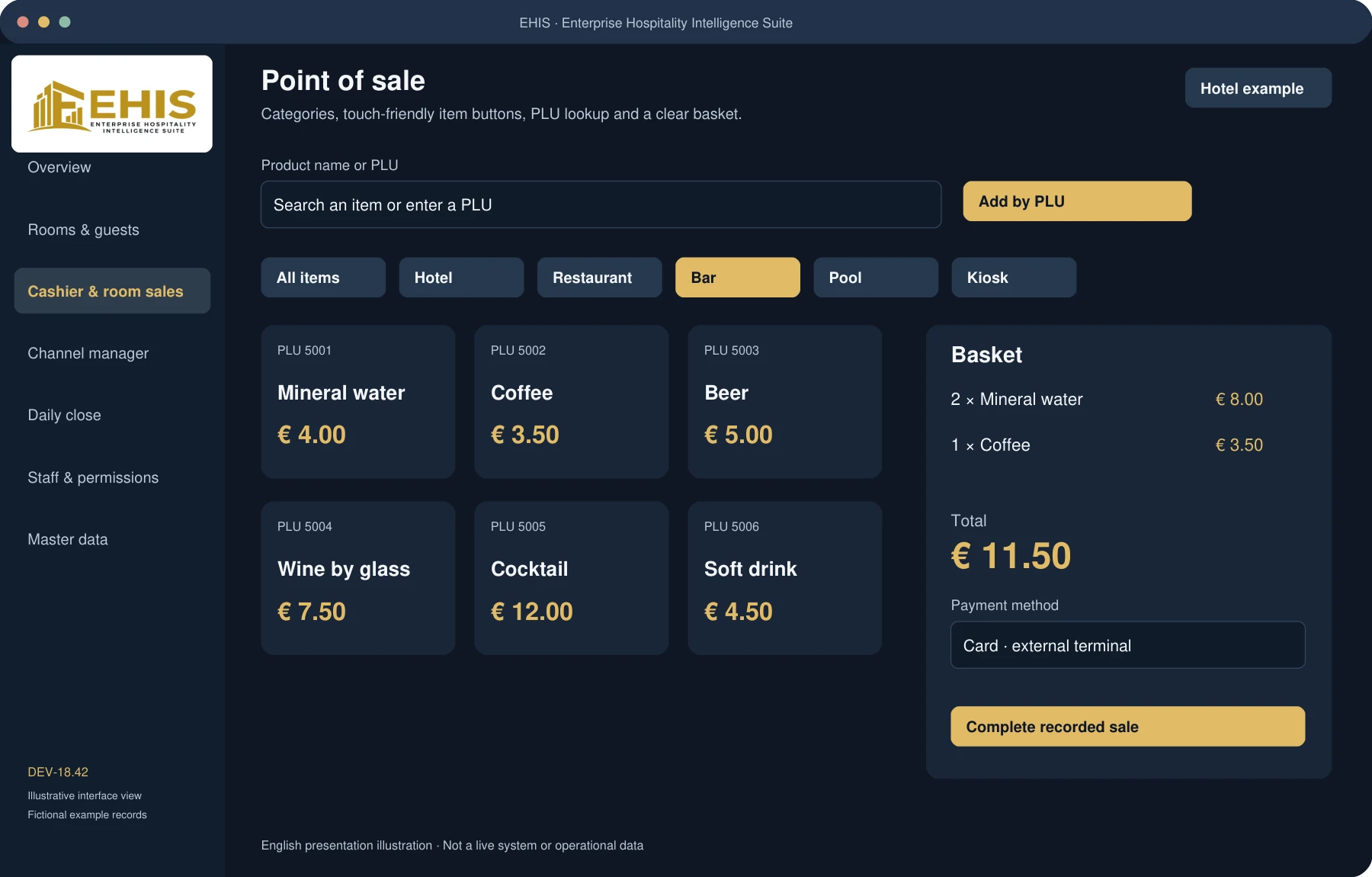
Point of sale
Point-of-sale illustration with bar items, PLU numbers, quantities and a basket.
Food &Amp; Beverage · Illustration
Products, PLUs & categories
Catalogue illustration covering hotel, rooms, cleaning, restaurants, bars, pool, room service, kiosk, newspapers and expenses.
Front &Amp; Office · Illustration
Guest & billing data
Illustrative guest profile with fictitious address, company and contact fields.
Management · Illustration
Daily close & reconciliation
Business-day controls and reconciliation of cash, card, bank, outlet sales, commissions and invoice drafts.
Management · Illustration
Channel reporting & commissions
Channel reporting illustration with revenue, commission and net after commission; live connectivity is not claimed.
Administration · Illustration
Extended invoice master data
Extended master data illustration with issuer, tax, company registry, bank details and payment terms; no real bank data shown.
Front &Amp; Office · Illustration
Invoice drafts & printing
Invoice illustration with service lines, VAT breakdown, payment balance and bank-detail section; clearly marked as draft.
Administration · Illustration
Staff & function permissions
Staff management illustration showing roles and individual permissions; priority does not grant access rights.
Administration · Illustration
Guided setup & prepared interfaces
Guided setup illustration covering hotel data, room structure, OPERA, channel and fiscal-provider configuration.
EHIS is a software project developed by Volker Weber, informed by his international experience in hotel operations, food & beverage management and financial performance.
The idea is practical: connect the operational detail with the management picture. Keep guest accounts, sales, payments and reports understandable, so the figures can support a clear conversation about the business.
Guest records, room accounts, overnight charges, cashier sales, catalogue management, staff permissions, master data and daily-close snapshots are available in the current Windows development release.
Local data is held in an encrypted SQLite-backed store. This is a single-workstation workflow, not a synchronised multi-terminal deployment.
Provider setup required
External systems and payments
OPERA Cloud / OHIP and channel-provider bridge interfaces are prepared. Live use requires supplier credentials, property mappings and validation against the real systems.
Card types can be recorded, but actual card acceptance requires an external terminal or an approved payment-provider integration. Bank payments are recorded after receipt is confirmed.
Draft documents
Invoices and fiscal processing
Invoice drafts include guest and issuer data, service details, taxes, payments and configured bank information. Browser printing or PDF saving is supported.
Fiscalisation, a fiscal Z-close, structured electronic invoicing and production acceptance remain separate integration work. Starter products require verified prices, tax classifications and real stock.
Current feature reference: DEV-18.42 · 18 October 2026 · Interface illustrations do not imply certified connectivity or production approval.
A few practical answers
Before we talk.
Can the categories and product catalogue be expanded?
Yes. The local application supports additional categories and products, outlet-specific PLUs, price and tax settings, and stock tracking where appropriate. The 35 starter templates are inactive until configured.
Can a room account be settled using different payment methods?
Yes. Record partial payments by cash, card or confirmed bank transfer against the same room account. Payments reduce the balance and are kept separate from revenue. Personal function permissions apply.
Are all booking channels already connected?
No. The channel workspace and provider bridge interfaces are prepared. Real supplier access, channel and property mappings, and acceptance testing are needed before live connectivity can be claimed.
Are the images real hotel or guest records?
No. They are English-language interface illustrations with fictional records and figures, prepared to explain the current software's workflows. No real guest, account or bank information is shown.
How can I discuss the software or see a walkthrough?
Contact Volker Weber at info@volker-weber.de to discuss the project and the requirements of your property.
Let's talk hospitality
Your hotel. Your operational priorities.
Start a conversation about EHIS and the workflows that matter to your business.